Termbox Concepts
Termbox Concepts
termbox-glib keeps the drawing model from termbox2. The API is small because the terminal screen is treated as a grid of cells, and applications draw into a buffer before presenting it.
Coordinates
Terminal coordinates are zero-based. The upper-left cell is (0, 0). The x
coordinate moves right, and the y coordinate moves down.
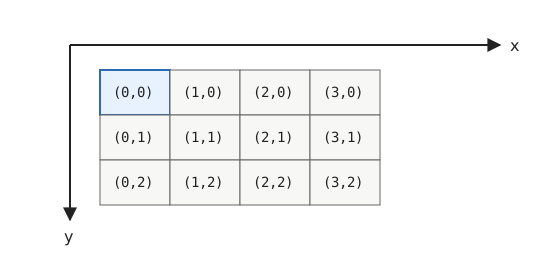
Most drawing functions take an x and y coordinate. If the starting
coordinate is outside the terminal, the call fails with
TBG_ERROR_OUT_OF_BOUNDS. If text starts inside the terminal and
then extends past the edge, the out-of-bounds part is ignored.
Cells
A cell is one position in the terminal grid. In termbox-glib it stores:
- a primary Unicode code point,
- foreground attributes,
- background attributes,
- optional extra Unicode code points for a grapheme cluster.
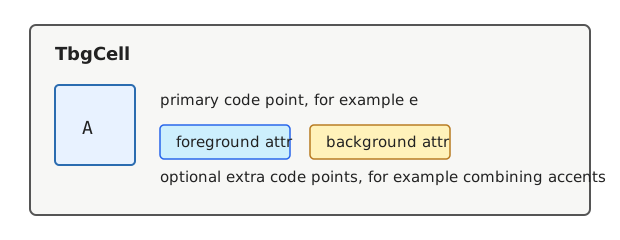
A grapheme cluster is what a user sees as one character on screen, even when it
is encoded as multiple Unicode code points. For example, e plus a combining
acute accent can be stored in one cell and displayed as é. The primary code
point is the base character, and the optional extra code points hold the
combining marks or other code points that belong to the same displayed cell.
tbg_terminal_set_cell() sets one code point. Use
tbg_terminal_set_cell_ex() when a cell should contain multiple code
points, such as a base character plus combining marks. Use
tbg_terminal_get_cell() to copy a cell out of the front or back buffer.
Back Buffer and Front Buffer
Drawing functions update the back buffer. The front buffer is termbox’s record of what has already been written to the terminal.
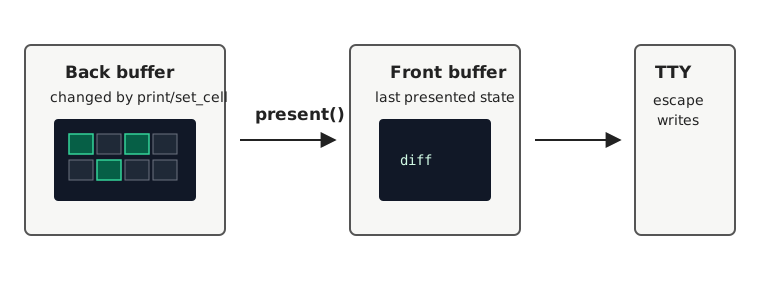
tbg_terminal_present() compares the back buffer with the front
buffer, writes only the needed terminal changes, and updates the front buffer.
You normally draw a frame into the back buffer and then call present() once.
tbg_terminal_invalidate() clears the front buffer so the next
present() performs a complete repaint. This is useful after changing output
modes or when the terminal needs to be redrawn from scratch.
Text Output
tbg_terminal_print() and tbg_terminal_print_ex() interpret
strings as UTF-8. Non-printable characters and truncated UTF-8 byte sequences
are replaced with U+FFFD. Newlines move output to the next row.
The _ex variant additionally reports the display width. For strings that
contain newlines, this width is reported as if the string were on one line,
matching termbox2.
Presenting a Frame
A typical frame looks like this:
tbg_terminal_clear (terminal, &error);
tbg_terminal_print (terminal, 0, 0, fg, bg, "hello", &error);
tbg_terminal_present (terminal, &error);
For incremental interfaces, it is also fine to update only the cells that
changed and then call present().
Events and the Main Context
Terminal input is exposed through a GSource created with
tbg_terminal_create_event_source(). Attach the source to the main
thread’s GMainContext and listen to the typed signals on
TbgTerminal.
The generic TbgTerminal::event signal receives
TbgEvent. Typed signals receive values with narrower APIs:
TbgTerminal::key receives TbgKeyEvent,
TbgTerminal::mouse receives TbgMouseEvent, and
TbgTerminal::resize receives TbgResizeEvent.
Input mode controls how terminal input is decoded. Use
tbg_terminal_set_input_mode() to enable mouse events or choose how
Escape and Alt are represented.
Output Modes and Attributes
The output mode controls how attributes are interpreted by termbox2. Use
tbg_terminal_set_output_mode() to select normal, indexed, grayscale,
or truecolor output.
Attributes are TbgAttr values. Use tbg_attr_default() for
the terminal default, tbg_attr_color() for the eight basic colors,
tbg_attr_indexed() for palette indexes, and tbg_attr_rgb()
for truecolor. TbgAttrFlags adds style bits such as bold,
underline, reverse, italic, blink, strikeout, overline, and invisible text.